AI Studio
Ask the question. Get the answer with the sources.
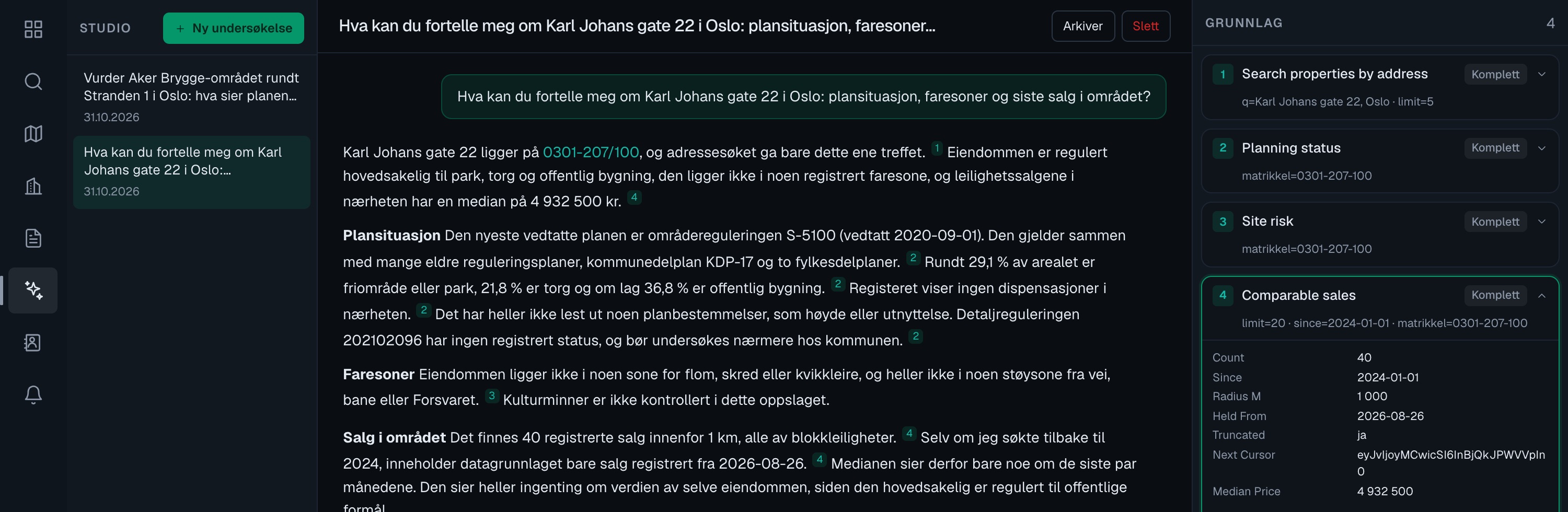
AI Studio is an analyst that looks things up in the registers for you: the Matrikkel, the land register, Brønnøysund, plans, hazard zones and heritage. You get a short summary, and every lookup is attached as a card with source and date.
01 / How it works
The lookups are shown, not just the answer.
You ask about an address, a parcel number, a plot or a company. AI Studio does the lookups itself and writes the answer from them.
- A card for every lookupEach lookup is a card with sources, date and whether the answer is complete, partial or not found.
- CitationsEvery sentence stating a register fact points to the card it rests on. Click to see the figures.
- Saved as an investigationThe conversation, the cards and the findings are saved, and you can continue from another browser.
- FindingsSave a conclusion in your own words, tied to the cards it rests on.
- Norwegian or EnglishThe answer comes in the language you write in.
02 / Start from what you are looking at
The subject is already set.
The "Investigate in studio" button sits where you work, and opens studio with the subject filled in.
- PlotFrom the plot dossier.
- CompanyFrom the company page.
- ProjectFrom a project.
- Site searchFrom a plot in site search.
03 / Playbooks
The same lookups every time.
A playbook runs the lookups in a fixed order and writes one brief, so two plots can be compared on equal terms.
- Site due diligenceProperty facts, planning situation, hazard zones and constraints for a plot.
- Acquisition screenA first look at a property before you spend time on it.
- Plan checkThe plans and provisions that apply to the plot.
- The result is savedThe brief is saved as an investigation you can open again.
04 / From answer to work
Findings and the weekly brief.
AI Studio puts the results where the work happens.
- To the data roomA finding can be added as a DD finding in a project's data room.
- Note in the projectThe summary can be saved as a note in the project.
- Weekly brief per projectEvery Monday studio runs the weekly lookups on the project's subject, compares with the previous brief and emails you the result.
05 / Limits
What to know.
AI Studio is a way to read the registers faster, not an adviser.
- Register data onlyAI Studio does not state what the registers do not hold, and says when something is missing or out of date.
- Daily budgetEach organisation has a daily model budget, reset at midnight.
- OwnersOwners of property are not yet named in studio, although the app shows them.
- Not adviceAI Studio gives no investment, legal or tax advice.
AI Studio can make mistakes. Check figures against the cards and the sources before you use them.
Included in proptrac
280NOKper user / monthExcl. VAT. Everything is included, this too.
No modules and no packages to choose between. Every user gets all of proptrac, with no lock-in — and free during the beta.
More in proptrac
- Property 360Everything the registers know about one property, on one page.
- Map layers152 public map layers with delivery dates.
- Sea and coastAquaculture, ships and ports, tied to the companies behind them.
- Site searchFind the site from what you know about it.
- New-build mapWhat is being built across Norway, phase by phase.
- Feasibility studyA block on the plot, with area, dwellings and land value.
- Plot valuationPlot value from sales and the residual, with the basis shown.
- Property valuationValue as a range, on your own figures.
- 3D designerVolumes on the plot, with sun, shadow and sight.
- Map editorYour own layers with your own fields, import and sharing.
- Find tenantsCompanies around the property, ranked by growth.
- Investment analysisIRR and cash flow from your own assumptions.
- Pulse and thresholdsWhat is approaching, before a rule fires.
- NewsThe news about your companies.
- Plot screeningScreen a municipality for plots that carry more than they cost.
- Rent rollTenants checked against the registers every day.
- API and MCPproptrac in your own systems and in your AI assistant.
- All modulesProjects, financing, relationships, alerts and team.